Does Radiccio support Spatial Audio?
For Apple Music sources:
No, unfortunately. The stereo version of the content will be played.
This seems to be a limitation of MusicKit on macOS. We have reported this to Apple (FB19763514) and we hope that Apple will address this in the future.
For all other sources:
Yes, but only for specific compatible formats. It must be a format that QuickTime Player works with. We have had some success playing files encoded with a 5.1 channel layout, encoded with EAC3 codec, in an MP4 container. AC3 and 7.1 are likely to work also. DTS does not work. Because the compatibility is determined by AVFoundation (which Apple maintains), and not by us, we can’t provide a complete list of what is or is not compatible; we can only test samples that we have created or obtained, and report the results here.
In order to use Spatial Audio, you will need an output device that macOS recognizes as capable of Spatial Audio, such as AirPods (only some models supported; see Apple web site for details).
If you are using compatible AirPods, you can click the AirPods icon in your menu bar to find out if it is currently using Spatial Audio. While audio is playing, in the top right of the menu, it should say something like “Stereo” or “Multichannel” next to the Radiccio icon.
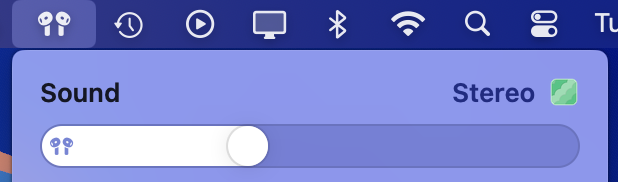

For non-Apple headphones and speakers, check with the vendor for information about their Spatial Audio support. At this time, we do not have any information about non-Apple products.
If you have an Apple TV, you can AirPlay from Radiccio to your Apple TV, and it should be able to output surround audio, if you have a surround audio system connected to the Apple TV via HDMI and properly configured, and also using supported audio formats as explained above.
What is Spatial Audio?
This is a complicated topic and we can’t really provide a full and complete explanation, but we’ll do our best to summarize as it is relevant to Radiccio.
Our intention is to use the term in basically the same way that Apple uses it in macOS, which may not be the same way that other companies or people use the same terms.
In this context, “Spatial Audio” means the audio device (such as headphones or speakers) creates an experience that sounds like the sound is coming from all around you (as contrasted with “stereo” which just means left and right, or “mono” which means it comes from only one place). Different products accomplish this differently. Headphones and some speakers do this by “projecting” sounds to create the impression that they are at specific points in space relative to your listening location, even though they are not physically in those places; this is broadly similar to the ancient stagecraft technique of ventriloquism. Some products may instead do this by physically placing speakers at various points throughout the room, i.e., the traditional “surround sound” method. Or some systems may use a hybrid approach of both techniques at the same time.
In the case of headphones, head tracking can be part of the Spatial Audio experience, but you can turn this off in System Settings if you prefer not to use it. Generally, Apple only seems to use the “Spatial Audio” term with devices that are capable of head tracking, but they are still referred to as such even when the user has disabled head tracking.
Spatial Audio is not a file format, nor is it a specific technology. It is a more general term for type of experience that can be implemented in several different ways. There are numerous file formats that can be used to create a Spatial Audio experience; technically, any file format that supports at least 4 channels (ideally more) can work with Spatial Audio. In the case of Radiccio, it needs to be one of our supported formats.